System info
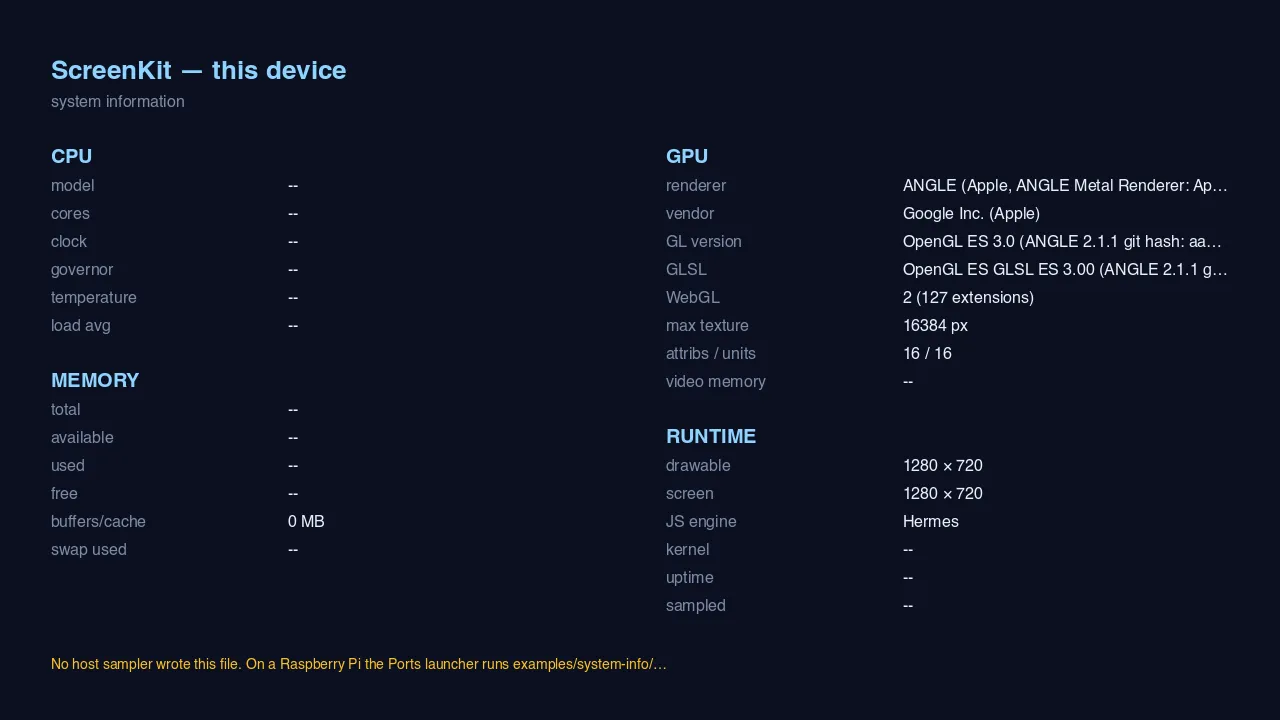
What you are looking at: the runtime describing its own host. On the macOS capture above, the GPU
column is filled in from live GL queries — ANGLE (Apple, ANGLE Metal Renderer), OpenGL ES 3.0,
WebGL 2 with 127 extensions, a 16384 px maximum texture — and the runtime column reports the drawable
at 1280 × 720 with Hermes underneath.
The dashes are not a bug. CPU, memory and kernel come from a host sampler that writes a file before launch, which exists on the Raspberry Pi’s Ports launcher and not on macOS. The app says so in the amber line at the bottom rather than showing zeroes:
No host sampler wrote this file. On a Raspberry Pi the Ports launcher runs
examples/system-info/…
What it proves
Section titled “What it proves”No engine. No assets. It is the smallest app in the repo, and that makes it a clean test of one thing:
| Exercised | How |
|---|---|
| Canvas 2D text | the whole panel is drawn with fillText |
| Canvas as a texture source | that 2D canvas is uploaded to WebGL, which is what Pixi and Phaser do underneath |
gl.getParameter coverage |
the GPU column is live GL queries, not a lookup table |
If text is broken in the runtime, this app is where it shows first and clearest — there is nothing else on screen to hide behind.
Useful for a bring-up
Section titled “Useful for a bring-up”When you put ScreenKit on a board for the first time, this is the app to run. It answers, in one screen: did GL come up, which backend won, is WebGL 2 available, how big a texture will the driver give, and what size does the runtime think the screen is.
Run it
Section titled “Run it”npm run build:screenkit -w screenkit-example-system-inforuntime/build/macos/screenkit-host --window examples/system-info/app.skpkgOn a Pi it is a Ports entry like any other app, and there the CPU and memory columns fill in.