Lightning 3 shaders
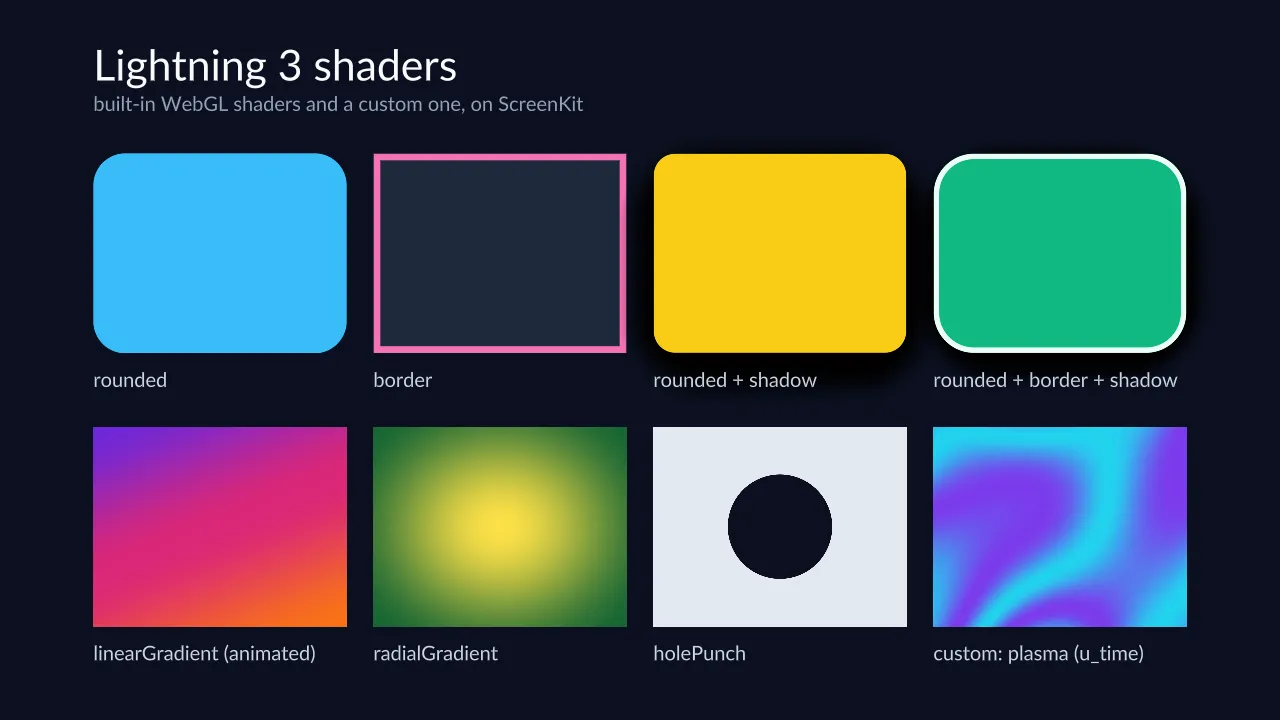
What you are looking at: eight different shader programs on screen at once, each labelled with
what it is. This puts far more on the GPU than a hello world, and each tile fails visibly and
distinctly if its shader is wrong — a missing holePunch is an unbroken rectangle, a broken
radialGradient is a flat fill.
The bottom-right tile is a custom plasma shader driven by u_time, so it redraws every frame.
If the runtime ever stopped feeding uniforms per frame, that tile would freeze while the other seven
kept looking correct.
What it proves
Section titled “What it proves”| Exercised | How |
|---|---|
| Eight distinct shader programs | rounded, border, shadow and their combinations |
| Uniform arrays | the gradient stops and colours |
| Reactive shader props | values changing per frame from JS |
| A timed shader | u_time on the custom plasma tile |
| Alpha and shadow compositing | the drop shadows on the top row |
Why this one matters for a port
Section titled “Why this one matters for a port”A hello world proves the GL entry points exist. This proves the object model around them holds up: uniform arrays, per-frame uniform updates, and several programs alive at once, each with its own state. It is the example that catches a GL layer that works for one program and falls apart with eight.
Run it
Section titled “Run it”npm run build:screenkit -w screenkit-example-lightning3-shadersruntime/build/macos/screenkit-host --window examples/lightning3-shaders/app.skpkg